
Home inspection • buying guide
Best Thermal Cameras for Home Inspection: 3 Practical Picks
Compare three thermal cameras for drafts, insulation, HVAC, and electrical checks—plus the limits that matter before you buy.
The best thermal camera for most repeat home inspections is the TOPDON TC004. It combines a useful 256 × 192 native detector with a dedicated screen, physical controls, and internal storage, so you can move from room to room without tying up a phone. Choose the TC004 Mini when compact size and long claimed runtime matter more than detector detail, or the TC002C Duo when you would rather carry a 30g USB-C module and use your phone as the screen.
Those recommendations are based on manufacturer documentation and thermal-imaging guidance, not hands-on testing by Focused Gadgets. Whichever format you choose, remember that a thermal camera shows surface-temperature patterns. It does not see through walls or diagnose the cause of an anomaly. When a safe access path already exists, our borescope guide explains how direct optical inspection can complement that surface scan.
Our thermal-camera picks at a glance
| Pick | Best for | Main advantage | Main compromise |
|---|---|---|---|
| TOPDON TC004 | Repeated whole-home inspections | Standalone workflow and 256 × 192 native detector | 520g body and ambiguous old/new listings |
| TOPDON TC004 Mini | Compact standalone use | Small dedicated tool with up to 15 hours claimed runtime | 128 × 128 native detector and no video recording |
| TOPDON TC002C Duo | Occasional inspections and easy phone sharing | 256 × 192 native detector in a 30g USB-C module | Depends on a compatible host, app, and phone battery |
Best overall: TOPDON TC004
The upgraded TC004 is the most balanced option here for surveying several rooms or returning to the same property over time. Its detector records 256 × 192 thermal samples, while TOPDON’s TISR processing can generate a 512 × 384 output. The native figure is the fair comparison point: processing can make an image easier to inspect, but it does not add new detector measurements.
The current model also has a 3.5-inch display, 64GB of internal storage, a 25Hz refresh rate, and Wi-Fi transfer to TOPDON’s mobile app. That self-contained workflow is valuable when you want to capture a sequence of windows, vents, breakers, or ceilings without connecting hardware to a phone at every stop.
Its main drawback is not image quality but purchasing clarity. TOPDON has sold an older, materially different TC004 under the same name. Before buying, confirm that the listing specifies the 3.5-inch screen, 64GB storage, Wi-Fi, and up to 8.5 hours of runtime. The linked TC004 review explains how to distinguish the upgraded model.
Best compact standalone: TOPDON TC004 Mini
The TC004 Mini keeps the screen and controls in a dedicated 350g body, but its 128 × 128 native detector captures one quarter as many thermal samples as the 256 × 192 cameras in this guide. That is a meaningful trade-off when you are trying to separate a narrow pipe, small electrical connection, or subtle insulation boundary from nearby material.
It still offers a 25Hz refresh rate, a 2.4-inch display, a stated sensitivity below 40mK, and a -20°C to 450°C measurement range. TOPDON claims up to 15 hours of use from the 2,900mAh battery. The 512MB of storage is for still images; the current specification table does not list video recording.
Choose it when you want a grab-and-go instrument for short checks and do not want to involve a phone. Skip it when fine spatial detail or extensive documentation matters more than size.
Best phone attachment: TOPDON TC002C Duo
The TC002C Duo provides the same 256 × 192 native resolution and 25Hz refresh rate as the full-size TC004 in a 30g module. It draws power from the connected device and uses TOPDON’s TopInfrared app for measurement tools, image fusion, capture, and sharing. That makes it the easiest of the three to carry and can simplify sending evidence to a contractor.
The trade-off is dependence. Your phone or tablet supplies the display, battery, storage, port, and operating system. TOPDON documents USB-C support for compatible iOS, Android, and Windows devices, but buyers should check the exact host and current app requirements before ordering. A cable in the box does not guarantee that every older Lightning device supports the camera.
This is the sensible option for occasional inspections when you already carry a compatible device. It is less appealing if a phone is needed for calls, photos, notes, or job software during the same inspection.
Specifications that change the inspection
| Specification | TC004 | TC004 Mini | TC002C Duo |
|---|---|---|---|
| Native IR resolution | 256 × 192 | 128 × 128 | 256 × 192 |
| Enhanced output | Up to 512 × 384 | Not the fair comparison figure | Up to 512 × 384 |
| Refresh rate | 25Hz | 25Hz | 25Hz |
| Stated sensitivity | ≤40mK | <40mK | <40mK |
| Temperature range | -20°C to 550°C | -20°C to 450°C | -20°C to 550°C |
| Display | 3.5-inch built in | 2.4-inch built in | Host device |
| Storage | 64GB internal | 512MB, still images | Host device |
| Power | Internal battery | Internal battery | Host device |
| Weight | 520g | 350g | 30g module |
For most residential work, the extreme upper temperature limit is not the deciding factor. Native resolution, stable focus, adjustable temperature span, and a workflow you will actually use are more important.
What a thermal camera can reveal at home
A thermal camera is good at showing differences. With suitable indoor and outdoor conditions, it can help you trace patterns around window frames, exterior walls, attic hatches, radiators, ducts, and electrical components. It can also show where a suspected damp area differs from nearby dry-looking material.
It cannot explain those patterns by itself. A cool patch might result from moisture, missing insulation, moving air, thermal bridging, or recent shade. If moisture is the concern, use the search-and-confirm process in our thermal-camera guide for suspected water leaks. A warm electrical component may be operating normally under greater load than its neighbors. Glass and polished metal can reflect infrared energy and mislead the reading.
A thermal camera also cannot detect airborne hazards. If radon is the concern, use a dedicated measurement method; our continuous-radon-detector guide explains the difference between fast feedback and a more representative long-term trend.
Manufacturers commonly illustrate building inspections with a substantial indoor/outdoor temperature difference. There is no single magic threshold for every wall and climate, but larger, stable contrast generally makes defects easier to see. Avoid scanning immediately after strong sun, rain, or abrupt HVAC changes when those conditions could dominate the surface pattern.
A practical room-by-room workflow
- Define the question. Look for a draft, insulation discontinuity, uneven radiator, or suspected moisture—not simply “something interesting.”
- Create useful conditions. Allow indoor and outdoor temperatures to diverge and keep doors, heating, or cooling in a consistent state.
- Compare like with like. Check similar windows, wall sections, vents, or loaded circuits instead of judging one colorful image in isolation.
- Adjust the span. A narrower manual range can make a subtle difference visible without changing the underlying measurement.
- Capture context. Save a visible-light reference or a wider thermal image before moving close to the anomaly.
- Confirm the cause. Use a moisture meter, airflow measurement, electrical test, or qualified inspection as appropriate.
When the inspection record also needs room dimensions or repeatable anomaly locations, our laser-distance-meter guide compares a simple indoor meter, a tougher green-beam model, and an app-connected two-way workflow.
Do you need a thermal camera at all?
Buy one when you expect to search broad areas repeatedly or when documenting patterns will make the next step easier. Borrow or rent one for a single energy audit. If your only question is whether a marked area of drywall is damp, start with the correct moisture meter. Our wood-moisture-meter guide compares pin and pinless choices, while the thermal camera vs. moisture meter guide explains how the tools work together.
Do not open energized equipment or enter an unsafe space just to get a clearer image. Water near wiring, signs of structural damage, or a suspected gas or refrigerant problem calls for the appropriate professional—not a more expensive camera.
Models discussed
Use these as starting points for checking fit. We do not publish a price or claim hands-on testing.
| Model | Format | Best fit | Trade-off |
|---|---|---|---|
| TOPDON TC004 3.5-inch Thermal Imaging Camera | Standalone thermal camera | Repeated room-by-room inspection | A separate device to carry and charge |
| TOPDON TC004 Mini Thermal Imaging Camera | Compact standalone thermal camera | A smaller self-contained kit | Lower native detector detail than TC004 |
| TOPDON TC002C Duo USB-C Thermal Camera | USB-C thermal attachment | Buyers with a compatible host device | Depends on phone or tablet and app |
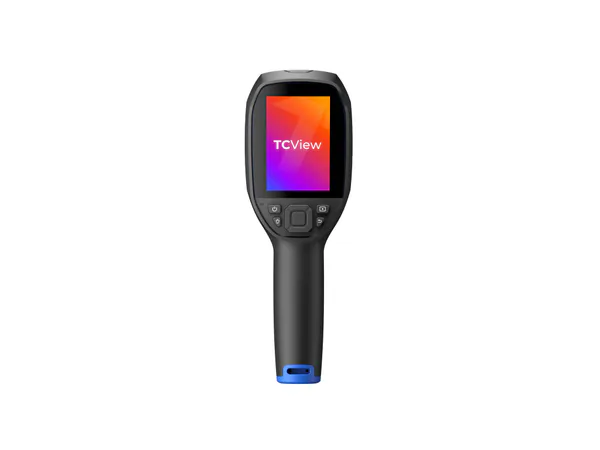
Product reference
TOPDON TC004 3.5-inch Thermal Imaging Camera
Best for: Repeated room-by-room inspection
Trade-off: A separate device to carry and charge
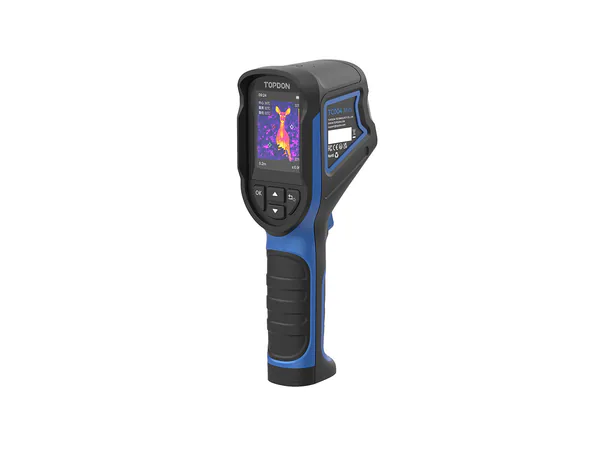
Product reference
TOPDON TC004 Mini Thermal Imaging Camera
Best for: A smaller self-contained kit
Trade-off: Lower native detector detail than TC004
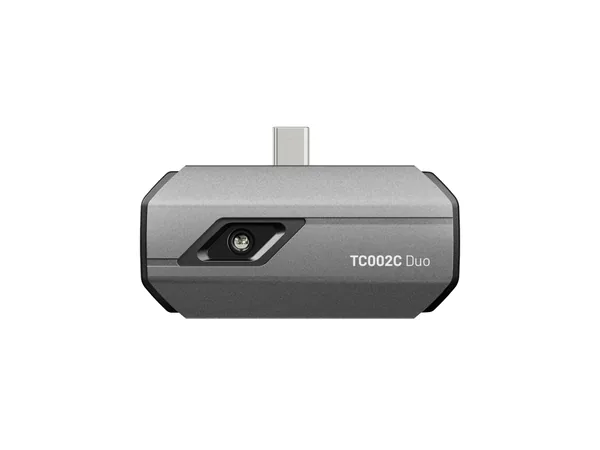
Product reference
TOPDON TC002C Duo USB-C Thermal Camera
Best for: Buyers with a compatible host device
Trade-off: Depends on phone or tablet and app
How this guide was researched
We compare documented product features against the job each buyer needs done. We have not physically tested these products. Check current specifications and availability with the manufacturer or merchant.
Affiliate disclosure: If you buy through a qualifying link, we may earn a commission at no extra cost to you.