
Home air safety • buying guide
Best Continuous Radon Detectors: Fast Alerts vs. Long-Term Confidence
Compare continuous radon monitors by first-reading speed, trend history, connectivity, power, and the limits of consumer screening.
A radon monitor can show a number quickly. That does not make the first number a dependable picture of year-round exposure. Indoor radon changes with weather, ventilation, pressure, and season, so the useful distinction is not simply which detector responds first. It is whether you need a simple long-term average, faster feedback while investigating changes, or remote access to radon and other air-quality trends.
The three devices here answer those needs differently. The Airthings Corentium Home 223 is a battery-powered, display-first monitor with no app. The Ecosense RadonEye RD200 is a plug-in monitor that updates rapidly and transfers history over Bluetooth. The Airthings View Plus 2960 adds Wi-Fi and six non-radon measurements, but costs more and introduces a larger app ecosystem.
This is a source-based comparison. Focused Gadgets has not physically tested or calibrated these monitors. A consumer monitor is useful for ongoing awareness, but it does not replace the testing procedure, qualified professional, or approved device that a real-estate transaction, regulator, mitigation contract, or other formal decision may require.
Quick answer
- Choose the Airthings Corentium Home 223 for simple, cable-free monitoring. It runs on three AAA batteries, shows short- and long-term averages on its own screen, and does not require an account or phone. Its first result arrives after 24 hours, and there is no remote alert or automatic history graph.
- Choose the Ecosense RadonEye RD200 when faster feedback matters. It reports an initial value after about 10 minutes and updates its display every 10 minutes, which is useful for watching direction after a ventilation or mitigation change. It must remain plugged in, and its phone connection is Bluetooth rather than Wi-Fi.
- Choose the Airthings View Plus 2960 for a connected indoor-air dashboard. It combines radon with PM2.5, carbon dioxide, volatile organic compounds, temperature, humidity, and air pressure. Wi-Fi trends and notifications make it better for remote awareness, but it is excessive if you only want a radon number on a local screen.
| Monitor | First useful display | Power and connection | Best fit | Main compromise |
|---|---|---|---|---|
| Airthings Corentium Home 223 | First radon result after 24 hours | 3 AAA batteries; no app or wireless connection | Simple long-term monitoring and room-to-room screening | No remote alerts or graphing |
| Ecosense RadonEye RD200 | First reading in about 10 minutes; updates every 10 minutes | 12V plug-in power; Bluetooth app | Watching short-term direction and local history | No battery operation or Wi-Fi/cloud access |
| Airthings View Plus 2960 | Radon samples hourly; confidence improves with time | 6 AA batteries or USB-C; Wi-Fi and Bluetooth | Remote radon plus broader air-quality trends | Higher cost and more setup than a radon-only monitor |
Fast feedback and long-term confidence are different jobs
An early reading answers, “What did this sensor observe during a short interval?” It does not answer, “What is this home’s typical annual radon exposure?” A responsive monitor can help reveal whether a mitigation fan stopped or whether a ventilation change coincides with movement, but a single spike or dip should not carry the weight of a long observation period.
The U.S. Environmental Protection Agency defines short-term tests as two to 90 days and long-term tests as more than 90 days. Its current home-buyer guide says the long-term result is more likely to represent the year-round average because radon varies from day to day and season to season. The same guide says all radon tests should run at least 48 hours, even when an electronic monitor starts displaying data sooner.
That is why the RD200’s fast first result and the Airthings devices’ improving multi-day precision can both be useful without being interchangeable. Speed helps with observation. Time improves confidence about exposure.
Airthings Corentium Home 223: best for simple long-term monitoring
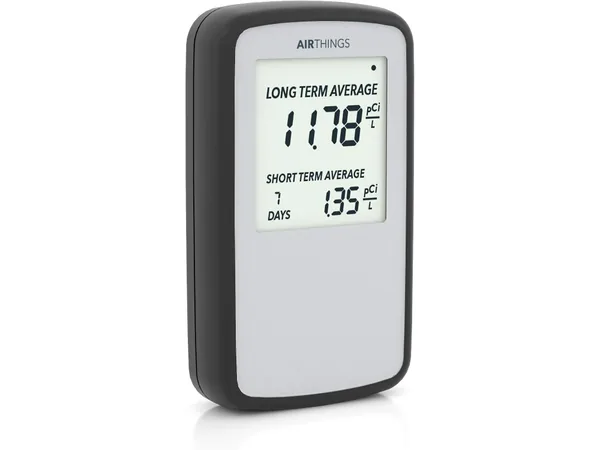
The Corentium Home 223 is the least connected choice and, for many households, that is its appeal. The device uses a passive diffusion chamber with alpha spectrometry and displays short- and long-term averages on an integrated LCD. There is no app, account, Wi-Fi network, or power cable to configure.
Airthings identifies the U.S. version as model 223. Its current product material specifies a measurement range of 0 to 500 pCi/L, a first result in 24 hours, and approximately two years of operation from three AAA batteries. The enclosure is roughly 4.7 by 2.7 by 1 inch and weighs about 5.2 ounces, so it is easy to place without dedicating an outlet.
The manufacturer’s precision figures also illustrate why patience matters. At 5.4 pCi/L, Airthings specifies approximately 10% precision after seven days and approximately 5% after two months. Those are controlled specification figures, not a promise that any individual home reading is perfectly accurate, but the direction is important: a longer sample contains more detected events and is more stable than day-one data.
The compromise is visibility. You need to stand in front of the unit to read it, and there is no automatic chart, push notification, or remote status check. Moving it between rooms is possible, but every move starts a new location-specific observation; do not blend results from different rooms into one conclusion.
Choose the Corentium Home when you want a self-contained monitor that can sit in the lowest regularly occupied level for months. Choose something connected if you need remote alerts, automatic graphs, or evidence that the device is still reporting while you are away.
Ecosense RadonEye RD200: best for watching changes sooner
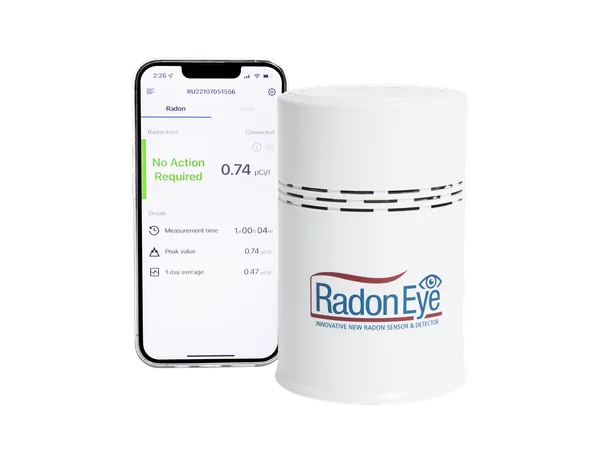
The RadonEye RD200 is built around fast, visible updates. Ecosense documents a pulsed ionization chamber, a first reading after about 10 minutes, a new measurement every 10 minutes, and a displayed 60-minute moving average. The OLED screen works without a phone, while the RadonEye app connects over Bluetooth to retrieve and graph stored data.
That cadence makes the RD200 the clearest fit for investigating direction. After a mitigation system is serviced, for example, the monitor can show whether readings appear to be moving down without waiting a full day for the first display. It is still not proof that a brief change represents the home’s long-term average, and it is not a substitute for the follow-up test or professional procedure required by a mitigation contract.
Ecosense specifies a 0.2 to 99.9 pCi/L range and sensitivity of 30 counts per hour per pCi/L. Its stated precision is within plus or minus 10% at 10 pCi/L after 10 hours. That number should not be compared directly with Airthings’ seven-day figure as if it were a race: the manufacturers specify different concentrations, time windows, sensors, and test conditions.
The practical trade-offs are power and connectivity. The RD200 uses a 12V adapter rather than batteries, so a convenient outlet and uninterrupted power matter. Bluetooth is local-range access, not whole-home Wi-Fi or cloud monitoring. Ecosense says one phone can connect at a time, and the unit does not contain its own clock or calendar; time-related history is interpreted through the app. Its display still provides the current rolling value without a phone.
Choose the RD200 when prompt local feedback and an on-device display are more valuable than remote access. Skip it when the placement has no reliable outlet or when you need notifications while away from the property.
Airthings View Plus 2960: best for connected, multi-pollutant trends
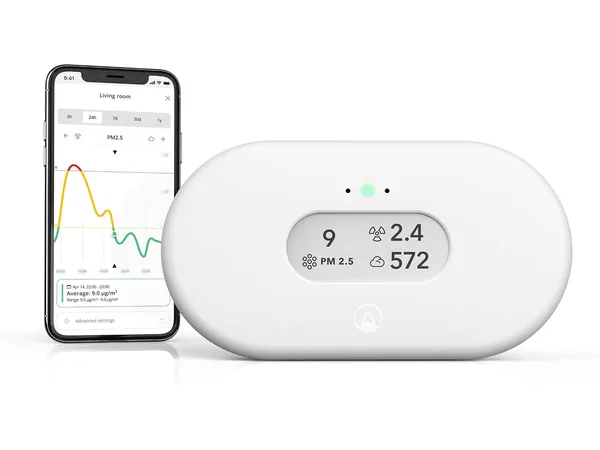
The View Plus 2960 expands the decision beyond radon. Its sensors cover radon, PM2.5 particles, carbon dioxide, volatile organic compounds, temperature, humidity, and air pressure. A 2.9-inch e-ink display provides local readings, while 2.4GHz Wi-Fi sends data to the Airthings dashboard and app. Bluetooth is used during onboarding, and Airthings SmartLink can connect compatible devices through it as a hub.
For radon, Airthings specifies the same 0 to 500 pCi/L range and the same approximate precision progression at 5.4 pCi/L as the Corentium Home: 10% after seven days and 5% after two months. The sensor samples every 60 minutes. That is adequate for trend monitoring, but it is not the fastest option here for observing immediate movement.
The main reason to pay more is context and access. A rise in particles while cooking, elevated carbon dioxide in a closed bedroom, or changing humidity can be viewed alongside the radon history. Wi-Fi access also suits a second home or basement that you do not visit every day. The unit can use six AA batteries for up to two years under the manufacturer’s stated conditions or USB-C power; particle-sensor frequency changes with the power source.
More sensors do not make it a universal safety alarm. View Plus does not replace smoke or carbon-monoxide alarms, and a VOC index does not identify a specific chemical. Buyers who only care about radon will spend more, configure more, and maintain a connected service without gaining a better annual average merely because the device measures more variables.
Choose View Plus when radon is one part of a broader indoor-air plan and remote history matters. Our indoor-air-quality monitor guide compares the same hardware as a multi-pollutant monitor; this recommendation is specifically about its fit for radon.
Placement can matter more than the feature list
Follow the instructions for the exact device and the procedure governing the test. In general, place a monitor in the lowest level that people regularly use, in a location representative of breathing air. Keep it away from floors, exterior walls, windows, doors, vents, direct sunlight, high heat, and high humidity unless the manufacturer or testing protocol says otherwise.
Do not put the monitor beside a sump opening or directly in a draft simply to find the highest possible number. That can turn a household-exposure question into a source-location experiment. Do not move it from room to room while trying to build one continuous average, because the resulting history describes multiple environments.
For a formal short-term test, placement and closed-building conditions are part of the procedure, not optional details. The EPA’s current buyer-and-seller guide describes closed-house conditions and tamper controls for real-estate testing. A seller, buyer, lender, state program, or mitigator may require a qualified professional or a specific approved device and report.
When a consumer monitor is not enough
Treat a continuous monitor as an awareness and trend tool. Escalate beyond the app or display when the decision has legal, contractual, or health consequences.
- Real-estate transaction: follow the applicable state and EPA transaction protocol and use the qualified tester or approved device the parties require.
- Persistently elevated readings: the EPA recommends fixing a home when the long-term average is 4 pCi/L or higher. Confirm the result and contact a qualified radon professional rather than trying to diagnose the building from hourly fluctuations alone.
- After mitigation: follow the installer’s post-mitigation test plan and maintain any required system checks. A consumer trend can be useful supporting information, but it may not be the acceptance test.
- Unexpected disagreement: co-located monitors can differ because of counting statistics, calibration, placement, and averaging windows. Check the manuals, give the instruments the specified time, and use an appropriate independent test when the result will drive an expensive decision.
Other inspection gadgets cannot answer the radon question. A thermal camera may reveal surface-temperature patterns, but it cannot see or measure radon; our home-inspection thermal-camera guide explains what that tool can and cannot establish.
Which monitor should you buy?
Buy the Airthings Corentium Home 223 if you want to set a small battery monitor in one location, read it without an app, and let the long-term average become more meaningful over weeks and months. Its simplicity is a feature, not an omission, unless you need alerts away from home.
Buy the Ecosense RadonEye RD200 if rapid local updates help you watch a change unfold and a nearby outlet is available. Its 10-minute cadence is useful for feedback, but the 60-minute moving average and early app graph should not be mistaken for an annual exposure estimate.
Buy the Airthings View Plus 2960 if you want Wi-Fi history and a broader picture of indoor air, and you will actually use the additional sensors. It is the best fit for connected monitoring, not the value choice for radon alone.
Whichever model fits, verify the exact ASIN, current specifications, warranty, app requirements, and price at the manufacturer and merchant before ordering. Prices and bundles change, and a newly displayed value still needs the time and testing context appropriate to the decision.
Frequently asked questions
How long should a radon monitor run before I trust it?
Use the device’s first reading for orientation, not a final exposure conclusion. The EPA describes two to 90 days as short-term testing and more than 90 days as long-term testing; a long-term result is more representative of the year-round average. Manufacturer precision specifications also improve as the monitoring period grows.
Is 4 pCi/L the safe level?
The EPA uses 4 pCi/L as its action level and recommends fixing a home at or above that level. An action threshold is not a guarantee of zero risk below it. Use the EPA and your state radon program for current testing and mitigation guidance.
Can I put a radon monitor in the basement?
Yes, if the basement is the lowest level that is occupied or could be used regularly and the placement follows the test instructions. An unfinished mechanical corner, floor drain, window ledge, or spot beside a sump may not represent the air people normally breathe.
Does a 10-minute radon reading beat a 24-hour reading?
It is faster feedback, not automatically a better exposure estimate. A short interval contains less evidence and is more affected by normal fluctuation. The correct comparison is the intended job: quick directional feedback versus stable long-term averaging.
Can a consumer monitor replace a professional radon test?
Not when a transaction, regulation, mitigation agreement, or other formal process requires a qualified tester, approved device, controlled placement, tamper detection, or certified report. Check the rules that apply before relying on a consumer dashboard.
Should I move one monitor between rooms?
You can use one device for separate room surveys, but reset or clearly separate each measurement period and allow the required time in every location. Do not combine readings from multiple rooms and describe them as one continuous long-term average.
Models discussed
Use these as starting points for checking fit. We do not publish a price or claim hands-on testing.
| Model | Format | Best fit | Trade-off |
|---|---|---|---|
| Airthings Corentium Home 223 | Standalone battery radon monitor | Simple cable-free long-term monitoring | No app, remote alerts, or automatic history graph |
| Ecosense RadonEye RD200 | Plug-in fast-updating Bluetooth monitor | Watching short-term changes and local trend data | Bluetooth-only access and no battery operation |
| Airthings 2960 View Plus | Wi-Fi display monitor with seven measurements | CO2, PM2.5, radon, and long-term connected trends | Higher cost and more setup; no carbon-monoxide sensor |
Product reference
Airthings Corentium Home 223
Best for: Simple cable-free long-term monitoring
Trade-off: No app, remote alerts, or automatic history graph
Product reference
Ecosense RadonEye RD200
Best for: Watching short-term changes and local trend data
Trade-off: Bluetooth-only access and no battery operation
Product reference
Airthings 2960 View Plus
Best for: CO2, PM2.5, radon, and long-term connected trends
Trade-off: Higher cost and more setup; no carbon-monoxide sensor
How this guide was researched
We compare documented product features against the job each buyer needs done. We have not physically tested these products. Check current specifications and availability with the manufacturer or merchant.
Affiliate disclosure: If you buy through a qualifying link, we may earn a commission at no extra cost to you.