
Workshop & hobbies • buying guide
Best Digital Microscope for Coins: A Practical Collector Setup
The Plugable 250x is a useful computer-connected coin microscope, but stable positioning and controllable lighting matter more than headline magnification.
The Plugable 250x Digital USB Microscope is our most defensible catalog pick for examining mint marks, dates, edge details, scratches, and surface texture on a computer. It is inexpensive, widely compatible, and captures still images without locking you into a proprietary display. Its weak point is the supplied flexible stand: a microscope can have adequate sensor resolution and still be frustrating if the camera moves whenever you adjust focus.
Buy it for close inspection and quick documentation, not professional coin grading or polished catalog photography. A copy stand and a good camera may produce better whole-coin images, while a loupe or stereo microscope gives a more natural direct view. Focused Gadgets has not physically tested the Plugable microscope.
Focused Gadgets verdict
The Plugable 250x is a sensible first digital microscope for a collector who already has a compatible computer or USB-C iPad and wants to share or save close-ups. Its 2MP sensor is adequate for screen inspection, and the adjustable LED ring is convenient. The camera’s fixed lighting geometry and lightweight gooseneck are the compromises: reflective coins expose both quickly.
Pros
- standard UVC camera design works with common camera software
- 1600 × 1200 still capture from a documented 2MP sensor
- adjustable LED halo and included observation stage
- USB-A cable plus a USB-C adapter in the current package
- two-year warranty and lifetime support stated by Plugable
Cons
- 640 × 480 video is modest despite the 2MP still-image specification
- flexible stand is better for observation than repeatable catalog photography
- built-in ring lighting can create glare on reflective or slabbed coins
- magnification depends on distance and screen size, so “250x” is not a fixed optical setting
- iPhones are not supported
Plugable 250x specifications that matter
| Specification | Plugable USB2-MICRO-250X |
|---|---|
| Sensor | 2MP |
| Still capture | 1600 × 1200 JPEG |
| Video | 640 × 480 at 30Hz |
| Magnification claim | Approximately 60x–250x, dependent on focus and working distance |
| Lighting | Adjustable 7000K LED halo, 0–38 lumens |
| Host connection | USB 2.0; USB-A cable with USB-C adapter |
| Compatibility | Windows, macOS, ChromeOS, Linux; supported Android and USB-C iPad configurations |
| Unsupported | iPhone |
| Microscope size and weight | 9 × 3 × 3cm; 84g |
| Warranty | Two years; lifetime support stated by Plugable |
The capture figures are more useful than the magnification label. Plugable explains that magnification changes as you move and focus the camera, and the apparent number also depends on display size. There is no optical zoom button that moves smoothly from 60x to 250x.
Lighting is the real coin-imaging problem
Coins reflect their surroundings. A ring of LEDs close to the lens can create a bright circular reflection, flatten relief, or hide fine hairlines. A slab adds another reflective surface and can make the problem worse.
Start with the built-in LEDs turned down rather than at maximum. If the important detail disappears in glare, switch them off and use one or two movable, diffused lights from the side. Moving the light changes how relief, luster, scratches, and toning appear, which is why a single dramatic image should not determine authenticity or grade.
Keep the coin flat and the camera sensor parallel to it when you want an evenly focused face. For edge lettering or a specific die marker, an angled coin holder can be more useful. Never clean a collectible coin to make it look better under magnification; cleaning can permanently alter its surface and value.
The included stand is usable, not ideal
The Plugable package includes an observation stage, suction cup, gooseneck, and C-clip. That is enough to begin, and the flexible arm makes it easy to approach an odd angle. Flexibility also means the image can shift after you touch the focus wheel.
For repeated photographs, mount the microscope to something more rigid or brace the stand so focus adjustments do not move the frame. Use software capture or a timer instead of pressing the physical snapshot control if that action shakes the camera. A measurement pad is helpful for scale, but it does not replace calibration when exact dimensions matter.
Will it show a whole coin?
That depends on coin diameter, sensor-to-coin distance, and the stand’s available height. Maximum magnification places the lens very close and shows only a small region. A whole dollar-sized coin requires a much wider field of view than a mint mark.
This is where a conventional camera or recent phone on a rigid copy stand may be better. It can frame the entire coin at higher overall resolution and leaves more room to position lights. The USB microscope earns its place when you want fast live magnification on a larger screen or close-ups that are awkward with a phone lens.
Computer and tablet compatibility
The microscope behaves like a standard USB Video Class camera. Plugable documents support for current Windows, macOS, ChromeOS, and Linux camera applications. Android compatibility depends on whether the particular phone or tablet permits an external UVC camera, and a third-party app is required.
USB-C iPads running iPadOS 17 or later can work with a compatible third-party camera app. Plugable explicitly says iPhones do not support this microscope. A USB-C-shaped port is not enough by itself; the port and operating system must support external camera data.
What a digital microscope cannot tell you
Magnification can reveal a seam, casting texture, tooling, damage, or a known die marker. It cannot authenticate or grade a coin by itself. Lighting can exaggerate or conceal surface characteristics, color varies between displays, and digital processing may sharpen artifacts.
Use it to document what is present, then consult appropriate references or a reputable grading/authentication service when value depends on the conclusion. Avoid using marketplace images as the only comparison for a suspected counterfeit.
Who should buy it?
Choose the Plugable 250x if you want an affordable live view on a computer, easy still capture, and close examination of specific details. Budget for a more rigid mount and separate lighting if you plan to build a consistent catalog.
Skip it if you need an all-in-one screen, natural binocular depth, professional whole-coin photographs, or iPhone compatibility. If a built-in display matters more than broad host compatibility, read our Elikliv EDM4 review; it is a conditional budget pick for close inspection, with important limits around whole-coin framing and computer support. For component work rather than collecting, see our digital microscope guide for soldering and PCB inspection.
Models discussed
Use these as starting points for checking fit. We do not publish a price or claim hands-on testing.
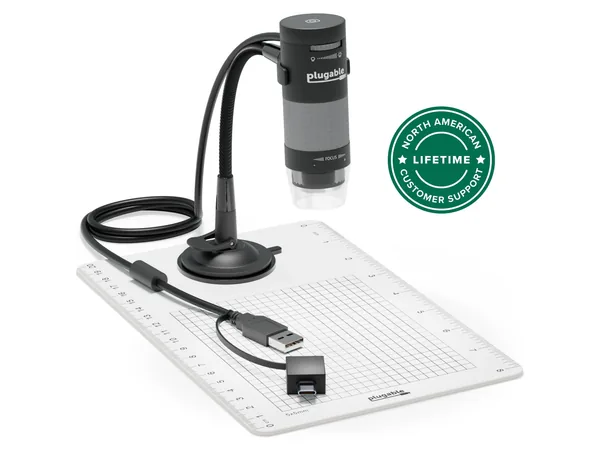
Product reference
Plugable 250x Digital USB Microscope
Best for: Inspection and capture with a computer
Trade-off: Host device and stand stability matter
How this guide was researched
We compare documented product features against the job each buyer needs done. We have not physically tested these products. Check current specifications and availability with the manufacturer or merchant.
Affiliate disclosure: If you buy through a qualifying link, we may earn a commission at no extra cost to you.