
Workshop & hobbies • buying guide
Best Digital Microscope for Soldering: Two Useful Bench Setups
Choose the Andonstar AD407 for a self-contained soldering bench or the Plugable 250x for inexpensive inspection and capture with a computer.
The Andonstar AD407 is the better digital microscope here for active bench work. Its 7-inch display, metal base, HDMI output, remote, and microSD recording keep the soldering station independent of a laptop. Choose the Plugable 250x for occasional PCB inspection, sharing, and inexpensive image capture when a computer is already on the bench.
Neither is the automatic answer for fine-pitch rework. A single camera view lacks the natural depth cues of a stereo microscope, and tool clearance depends on the exact lens height and stand geometry. Focused Gadgets has not physically tested either model, so these recommendations are based on documented hardware and workflow rather than measured latency or image quality.
Our picks at a glance
| Pick | Best for | Why it fits | Main compromise |
|---|---|---|---|
| Andonstar AD407 | A dedicated digital soldering bench | Built-in 7-inch screen, metal stand, HDMI, remote, and microSD capture | Flat camera view; no documented PC support despite “USB” in the product name |
| Plugable 250x | Occasional inspection and documentation | UVC compatibility, low cost, 1600 × 1200 still capture | Flexible stand and 640 × 480 video are limiting for active rework |
Best dedicated digital setup: Andonstar AD407
The AD407 packages the camera, screen, base, and vertical support as one station. That matters more than its “up to 270x” claim. You can leave it aligned over the work area, keep a laptop away from flux and tools, and use the remote or microSD card to capture evidence without touching the camera.
Andonstar documents a 4MP sensor, a 7-inch display, microSD support up to 32GB, and HDMI output. The listed video modes range from 2880 × 2160 at 24fps to 1920 × 1080 at 60fps and 1280 × 720 at 120fps under specified lighting. Higher frame rates can make hand and tool motion easier to follow, but the manufacturer does not publish a latency measurement. Resolution and frame-rate labels alone cannot guarantee a comfortable live soldering view.
The official specification lists a 5cm minimum focus distance and a base/stand footprint of 20 × 12 × 19cm. That gives you a starting point, not a promise that every board, iron, hot-air nozzle, and pair of tweezers will fit at the magnification you want. Sketch the working area before buying.
AD407 specifications
| Specification | Andonstar AD407 |
|---|---|
| Sensor | 4MP |
| Display | 7-inch built in |
| Video output | Up to 2880 × 2160 at 24fps; 1080p at 60/30fps; 720p at 120fps |
| Photo output | Up to 4032 × 3024 JPEG |
| Closest documented focus | 5cm |
| Storage | microSD up to 32GB |
| External display | HDMI |
| PC support | Manufacturer specification says no |
| Stand size | 20 × 12 × 19cm |
| Power | 5V DC |
One documentation inconsistency deserves attention: Andonstar calls this an “HDMI Digital USB Microscope,” yet its current technical table states PC support: No. Buy it for the built-in/HDMI workflow and treat any desired computer connection as something to confirm with Andonstar for the exact unit.
Best inexpensive inspection camera: Plugable 250x
The Plugable microscope behaves like a standard UVC webcam. Connect it to a supported Windows, macOS, ChromeOS, Linux, Android, or USB-C iPad setup, choose it in a camera application, and view or capture the feed. It is compact, bus-powered, and easier to store than a permanent bench microscope.
Its 2MP sensor captures 1600 × 1200 still images, but video is limited to 640 × 480 at 30Hz. That is enough for checking a connector, reading a small marking, or documenting corrosion. It is a modest foundation for continuous soldering, especially when the flexible gooseneck moves after focus adjustments.
The current package includes an observation stage, suction cup, gooseneck, C-clip, and USB-C adapter. Plugable does not support iPhone use. Android and iPad configurations require compatible external-camera support and third-party software.
Working distance decides whether soldering is possible
Working distance is the space between the front of the lens and the board while the subject is in focus. At high magnification, many inexpensive digital microscopes move closer to the board—exactly when you need room for an iron, tweezers, and your hands.
Do not compare only maximum magnification. Ask instead:
- Can the stand raise the lens enough to fit the complete board and tools?
- Does the field of view still cover the component and nearby pads at that height?
- Can the board slide without hitting the column or base?
- Will an iron, hot-air nozzle, or extraction hose block the light?
- Can you focus without shaking the camera?
A stereo microscope can provide substantially more clearance depending on its objective. Nikon’s SMZ445, for example, specifies 100mm in its standard configuration and longer distances with auxiliary objectives. That does not describe every stereo microscope; it shows why the exact working-distance number matters.
A screen helps sharing, not depth perception
A digital camera makes it easy to show a joint to another person, record a repair, or view the image without bending over eyepieces. It can also support a more upright posture if the screen sits at eye level.
The image is still two-dimensional. You infer height from focus, shadows, movement, and experience rather than receiving slightly different views in each eye. For inspection, that is usually acceptable. When placing a fine wire, judging solder volume, or moving a tool around taller components, the missing depth cues can slow the work.
If active microsoldering is the main job, read our digital versus stereo microscope guide before choosing a screen-based model.
Lighting and heat deserve planning
An LED ring near the lens produces convenient, even light but can reflect from solder and flux residue. Side lights reveal texture and reduce the chance that the iron or your hand blocks every LED at once. Adjustable brightness matters because an overexposed joint loses useful surface detail.
Keep the camera, plastic accessories, and cables clear of the iron and hot-air stream. A microscope is not fume extraction. Position extraction so it removes fumes without vibrating the stand or hiding the work.
Which one should you buy?
Choose the Andonstar AD407 when you want a dedicated screen, a more substantial bench stand, HDMI output, and local recording without opening a computer application. It is the coherent digital choice for recurring bench work, provided the 2D view and available clearance suit your boards.
Choose the Plugable 250x when the task is mostly inspection, teaching, or capturing a quick close-up. It costs less and works with ordinary camera software, but the stand and low video resolution make it less convincing as the center of a precision-rework station.
Choose a stereo microscope when direct depth perception and generous tool clearance matter more than effortless recording. For coins and other reflective flat objects, see our separate digital microscope guide for coin collectors.
Models discussed
Use these as starting points for checking fit. We do not publish a price or claim hands-on testing.
| Model | Format | Best fit | Trade-off |
|---|---|---|---|
| Andonstar AD407 3D HDMI Soldering Digital Microscope | Screen and HDMI digital microscope | A bench setup without a computer | Larger dedicated stand and display |
| Plugable 250x Digital USB Microscope | USB camera microscope | Inspection and capture with a computer | Host device and stand stability matter |
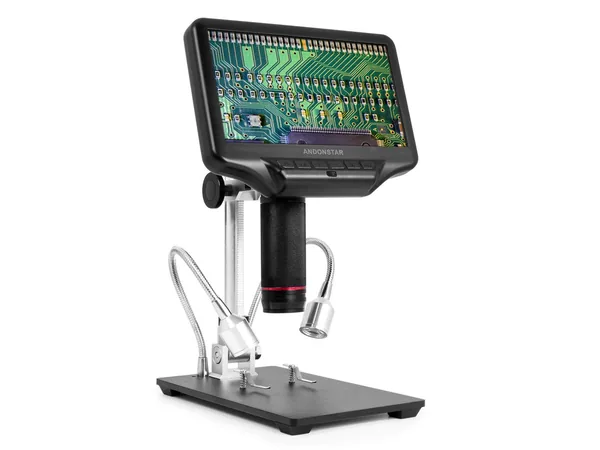
Product reference
Andonstar AD407 3D HDMI Soldering Digital Microscope
Best for: A bench setup without a computer
Trade-off: Larger dedicated stand and display
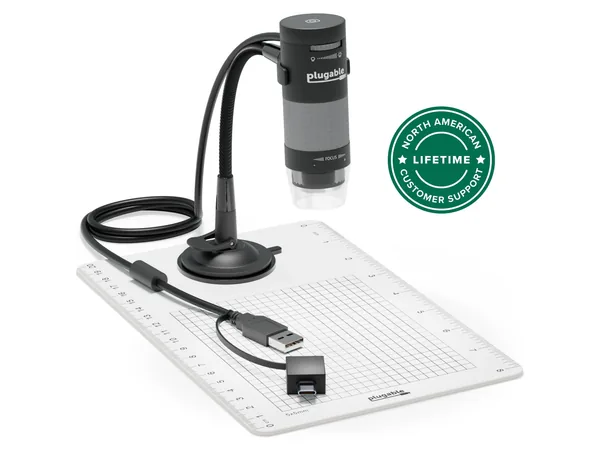
Product reference
Plugable 250x Digital USB Microscope
Best for: Inspection and capture with a computer
Trade-off: Host device and stand stability matter
How this guide was researched
We compare documented product features against the job each buyer needs done. We have not physically tested these products. Check current specifications and availability with the manufacturer or merchant.
Affiliate disclosure: If you buy through a qualifying link, we may earn a commission at no extra cost to you.