
Workshop & hobbies • explainer
Digital vs. Stereo Microscope for Soldering: Which Bench View Wins?
Stereo microscopes provide natural depth for active rework; digital microscopes make inspection, recording, and shared viewing easier. Choose by workflow.
Choose a stereo microscope if the main job is active soldering, component placement, jumper-wire work, or fine rework. Each eye receives a slightly different optical view, which provides natural depth cues as a tool moves toward a pad or around a component.
Choose a digital microscope if you mainly inspect boards, capture evidence, teach, stream, or want several people to see the same image. A screen can also support a more upright posture and is easier to integrate into a compact, occasional-use setup.
The decision is not really “old optics versus modern camera.” It is depth perception and direct response versus recording and shared viewing. Focused Gadgets has not performed a hands-on latency or optical comparison.
The practical differences
| Decision point | Digital microscope | Stereo microscope |
|---|---|---|
| View | Camera image on a built-in or external display | Direct binocular optical view |
| Depth cues | Flat image; depth inferred from focus, shadow, and movement | Natural stereo depth within the optical system |
| Recording and sharing | Usually straightforward when supported | Requires a camera port or separate attachment |
| Response | Depends on camera processing and display latency | Direct optical view has no camera/display delay |
| Working posture | Screen can be positioned independently | Eyepiece height and angle determine posture |
| Tool clearance | Depends on lens height, focus distance, and stand | Depends on objective, magnification, and stand |
| Space and cost | Entry-level options can be compact and inexpensive | Good optics and a stable boom stand generally cost more |
| Best fit | Inspection, documentation, teaching, occasional repair | Precision placement and sustained active rework |
Why stereo depth matters during rework
Looking at a PCB is not the same as touching it with an iron. Inspection asks whether a bridge, crack, lifted pad, or damaged connector is visible. Rework asks where the tip is in three dimensions and how far it can move before touching a neighboring part.
A stereo microscope sends a different view to each eye. That makes component height, wire position, and tool approach feel more immediate. It is particularly useful around tall connectors, small passives, and fine wires where a tiny vertical mistake matters.
A digital microscope can still support careful work. People learn to use shadows, changing focus, and motion as depth signals. The limitation is not that soldering becomes impossible; it is that the screen removes one of the most natural cues and may add processing delay.
Working distance matters more than maximum magnification
Working distance is the focused space between the objective and the board. More room means the iron, tweezers, hot-air nozzle, and hands can approach without hitting the optics or blocking all illumination.
Do not assume every stereo microscope offers generous clearance. Nikon’s SMZ445 is one concrete example: it lists a 100mm working distance in the standard configuration, with optional objectives extending it further. Other models can be very different.
Digital specifications can be equally easy to misread. Andonstar lists a 5cm minimum focus distance for the AD407, but that does not describe every usable camera height or guarantee the field of view at a chosen position. Draw the board and tool envelope before buying, then compare it with the exact stand’s vertical and horizontal travel.
Digital microscopes are better communicators
A camera view makes documentation easy. You can capture a corroded connector before cleaning, save a serial marking, record a repair, or point at the same pad while teaching someone else. An HDMI output can put the board on a large monitor, and a USB/UVC device can feed common capture software.
This shared view is the digital microscope’s strongest argument. It is also useful when eyepieces are inaccessible, several people need to follow the work, or visual evidence must be attached to a repair record.
Check the exact capture path rather than assuming “USB microscope” means computer video. Our Andonstar AD407 and Plugable 250x comparison shows the difference: Andonstar’s current AD407 table says PC support is unavailable despite the product name, while the Plugable 250x behaves as a standard UVC webcam. Ports and model names do not reliably describe workflow.
Stereo does not have to mean no camera
A trinocular stereo microscope adds a dedicated camera port while preserving binocular eyepieces. That hybrid can offer direct depth for the technician and a digital feed for recording or a second viewer.
The compromises are price, desk space, alignment, and camera setup. A camera attached to a stereo microscope may also show a different crop or exposure than the eyepieces. For occasional screenshots, a good all-in-one digital microscope is simpler. For daily rework that must also be documented, a trinocular setup is worth comparing.
Ergonomics can outweigh image quality
Long sessions punish a poor viewing position. A small built-in display mounted low over the board can still bend your neck, while fixed eyepieces can be just as uncomfortable if the stand or chair is wrong.
For a digital setup, place the main monitor close to eye level and keep the board under the hands rather than under the screen. For stereo, check eyepiece angle, interpupillary adjustment, stand reach, and whether the working height fits your chair and bench. A boom stand can move the optics over larger boards while leaving the base out of the way.
What to choose for common jobs
- Connector inspection and board documentation: Digital is usually enough and easier to capture.
- Occasional through-hole soldering: Either can work; a rigid stand and adequate clearance matter more than extreme magnification.
- Fine-pitch SMD placement and jumper wires: Stereo is the safer default because depth cues remain available.
- Teaching or streaming repairs: Digital or a trinocular stereo setup gives the audience a shared view.
- Portable field checks: A compact USB microscope is easier to pack, assuming the host device is compatible.
- All-day bench work: Prioritize optics, posture, stand stability, and working distance before recording features.
Do not overbuy magnification
PCB work rarely needs the largest number printed on an inexpensive microscope box. As magnification rises, the field of view and apparent working area shrink, hand movement looks larger, and focus becomes less forgiving. Comfortable low-to-moderate magnification with room for tools is often more useful than a dramatic close-up.
Likewise, a high-resolution digital output does not guarantee low latency, accurate color, or a stable stand. Read the resolution, frame rate, sensor, output, and mechanical specifications as a system.
Bottom line
For active precision soldering, start with a stereo microscope and add camera capture only if the workflow requires it. For inspection, documentation, shared viewing, or occasional repair, a digital microscope is easier to justify and usually less expensive.
If you prefer the screen route, the linked product comparison above covers a dedicated Andonstar bench unit and an inexpensive Plugable USB option. Collectors should use the separate coin microscope guide, where lighting and whole-object framing matter more than tool clearance.
Models discussed
Use these as starting points for checking fit. We do not publish a price or claim hands-on testing.
| Model | Format | Best fit | Trade-off |
|---|---|---|---|
| Andonstar AD407 3D HDMI Soldering Digital Microscope | Screen and HDMI digital microscope | A bench setup without a computer | Larger dedicated stand and display |
| Plugable 250x Digital USB Microscope | USB camera microscope | Inspection and capture with a computer | Host device and stand stability matter |
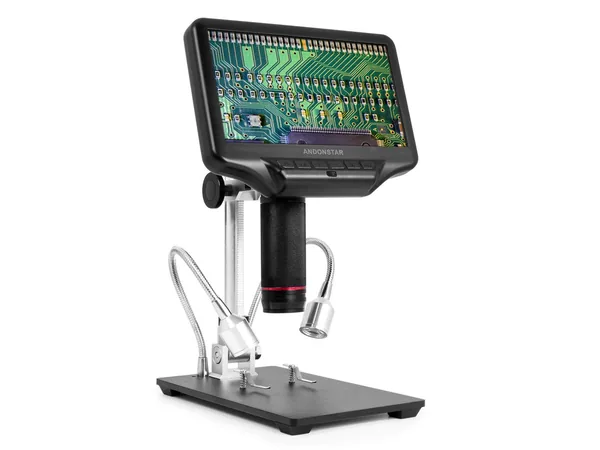
Product reference
Andonstar AD407 3D HDMI Soldering Digital Microscope
Best for: A bench setup without a computer
Trade-off: Larger dedicated stand and display
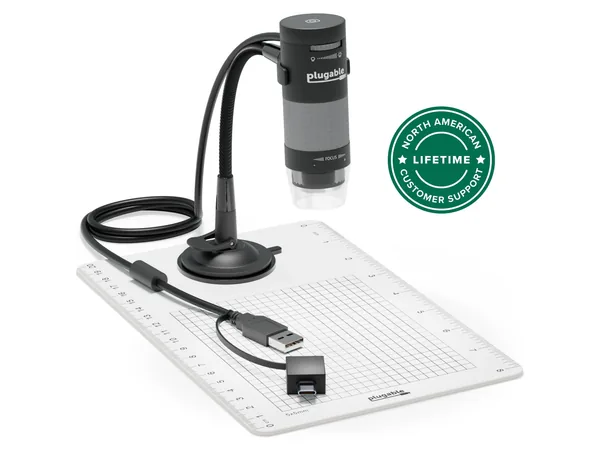
Product reference
Plugable 250x Digital USB Microscope
Best for: Inspection and capture with a computer
Trade-off: Host device and stand stability matter
How this guide was researched
We compare documented product features against the job each buyer needs done. We have not physically tested these products. Check current specifications and availability with the manufacturer or merchant.
Affiliate disclosure: If you buy through a qualifying link, we may earn a commission at no extra cost to you.