
Practice feedback • explainer
Swing-Speed Radar vs. Launch Monitor: Do You Need Ball Data?
A swing-speed radar is enough for speed drills. A launch monitor costs more because it connects club speed to ball speed, carry, launch, or dispersion.
Buy a swing-speed radar when the training question is simply, “Did that swing move the club faster?” Buy a launch monitor when you also need to know what happened to the ball—ball speed, carry, launch, direction, spin, or dispersion, depending on the model.
The Sports Sensors Swing Speed Radar is a focused tool for no-ball speed sessions and training-stick work. It has no app, no simulator, and no shot data. That simplicity is useful if speed is genuinely the goal; it is a dead end if you need to know whether faster swings still produce centered contact. Focused Gadgets has not independently tested its accuracy.
What each category tells you
| Practice question | Swing-speed radar | Basic launch monitor | Analysis/simulator launch monitor |
|---|---|---|---|
| Is clubhead speed changing? | Yes | Usually | Yes |
| Can I swing without a ball? | Yes | Only on supported models | Check the exact training mode |
| How fast did the ball leave? | No | Often | Yes |
| What was the carry distance? | No | Often | Yes |
| Was contact efficient? | No smash factor | Possible when club and ball speed are reported | Usually |
| What were launch, direction, or spin? | No | Often unavailable | Model-dependent |
| Can it run a simulator? | No | No | Only supported models/software |
The categories overlap. Voice Caddie’s SC200 Plus and Garmin’s Approach R10 cover two useful steps up: the SC200 Plus has a dedicated no-ball Practice Swing Mode but also reports ball speed, carry, and smash factor when you hit shots, while the R10 adds phone-based launch, direction, dispersion, saved sessions, and optional simulation.
Where the Sports Sensors radar fits
Sports Sensors designed its unit to display one number quickly. Its Golf Mode (40–200 mph) covers ordinary full-swing training, the unit uses three AA batteries, and it returns to ready in less than a second after a reading. No ball is required.
The manufacturer instructs golfers to place it 8–10in from the intended swing zone. That close position makes setup important. It must see the clubhead while remaining outside the club and ball path. Thin irons or training sticks may require a height or angle adjustment, and an implausibly high reading can mean the radar detected ball exit speed instead of the club.
Sports Sensors specifications
| Specification | Swing Speed Radar SSR364 |
|---|---|
| Golf speed range | 40–200 mph (64–320 km/h) |
| Bat mode range | 20–200 mph |
| Manufacturer accuracy claim | Nominally within 1% |
| Placement | About 8–10in from the swing zone |
| Display | Three-digit LCD |
| Power | Three AA batteries, not included |
| Dimensions | 3.75 × 5.5 × 1.31in |
| Weight | 11oz (312g) |
| Operating temperature | 40–110°F (4.4–43°C) |
| Warranty | One year |
Some retailer listings blur the 20mph lower limit across all uses. The official documentation assigns 20mph to Bat Mode and 40mph to Golf Mode. That matters for slower partial-swing drills.
No-ball speed is a trend, not a shot result
The manufacturer says swinging without a ball is suitable for relative comparisons, but golfers may see 5–10% lower speed without a target because the release changes. It recommends a foam or plastic practice ball when comparing a backyard session with actual ball-contact swings.
That is the right way to use a simple radar: keep the placement, club, warm-up, and drill consistent, then watch the trend across several swings. Do not treat the fastest isolated number as proof of useful progress. More speed with worse contact or balance may not produce a better shot.
The radar also provides no evidence of strike quality. A club can move quickly while the ball leaves slowly. A launch monitor that reports club speed and ball speed can calculate smash factor, giving a basic view of energy transfer.
When the SC200 Plus is worth the step up
Choose the Voice Caddie SC200 Plus when you want to retain no-ball speed practice but also measure actual shots. It displays swing speed, ball speed, smash factor, and carry or total distance on the unit and reads results aloud. It does not need a phone or subscription.
At roughly 5ft behind the ball, it also sits farther from the swing than the Sports Sensors unit. The four AAA batteries are rated for up to 20 hours, and the included remote changes club settings from the hitting position.
It does not report launch angle, direction, or spin, and it stores no sessions in an app. That makes it a practice monitor rather than a swing-analysis or simulation system.
When the Garmin R10 earns its extra setup
Choose the Garmin Approach R10 when you want to connect speed changes to shot shape, launch, and dispersion. Garmin identifies clubhead speed, ball speed, launch angle, and launch direction as measured radar values; several other outputs are calculated. The app records sessions and can overlay metrics on swing video.
The price of that context is workflow. The R10 needs a compatible phone, careful alignment, and 6–8ft behind the ball. Indoors, Garmin also specifies at least 8ft from ball to net. Home Tee Hero and some cloud or simulator features require a membership, while third-party software may have separate costs.
The linked Garmin R10 versus SC200 Plus guide compares those two practice approaches in detail.
How to choose without paying for unused data
Ask what decision the number will change:
- If you are following a speed program and need immediate clubhead-speed feedback, buy the dedicated radar.
- If you want to know whether speed gains transfer to centered contact and carry, buy the SC200 Plus or another model with club and ball speed.
- If you need launch, direction, dispersion, saved sessions, or simulation, move to an R10-class system after confirming room and software requirements.
- If you mainly want instruction on swing mechanics, a lesson and ordinary video may be more valuable than a longer metric list.
Do not assume a more expensive monitor automatically measures every displayed field directly. Manufacturers may calculate carry, spin, or club delivery from radar measurements and algorithms. Read the model-specific documentation rather than comparing only the number of metrics.
Bottom line
The Sports Sensors Swing Speed Radar is the sensible specialist tool for repeatable speed drills, especially without a ball. It is portable, self-contained, and deliberately limited.
A launch monitor becomes worthwhile when the ball’s response matters. The SC200 Plus is the straightforward middle ground; the Garmin R10 suits golfers who will use deeper analysis or simulation. Buy the least complicated device that answers the training question you will actually ask each session.
Models discussed
Use these as starting points for checking fit. We do not publish a price or claim hands-on testing.
| Model | Format | Best fit | Trade-off |
|---|---|---|---|
| Sports Sensors Swing Speed Radar | Swing-speed radar | Speed drills when clubhead speed is the only number needed, including swings without a ball | Does not report ball speed, carry distance, launch angle, or shot dispersion |
| Garmin Approach R10 portable golf launch monitor | Phone-connected launch monitor | Golfers who want shot metrics, session review, and optional simulation through a compatible phone | Needs an aligned radar setup and a compatible phone; some simulation features require membership |
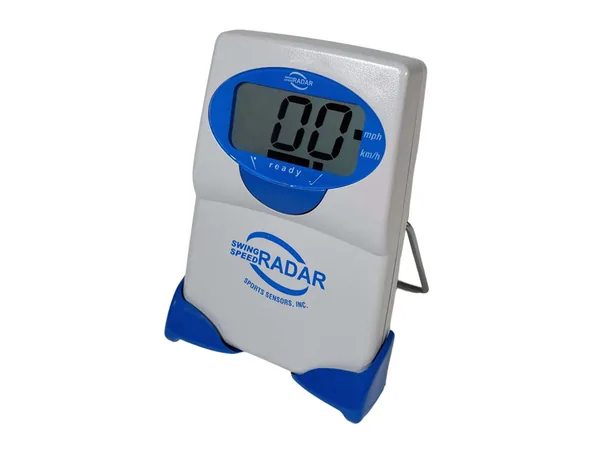
Product reference
Sports Sensors Swing Speed Radar
Best for: Speed drills when clubhead speed is the only number needed, including swings without a ball
Trade-off: Does not report ball speed, carry distance, launch angle, or shot dispersion
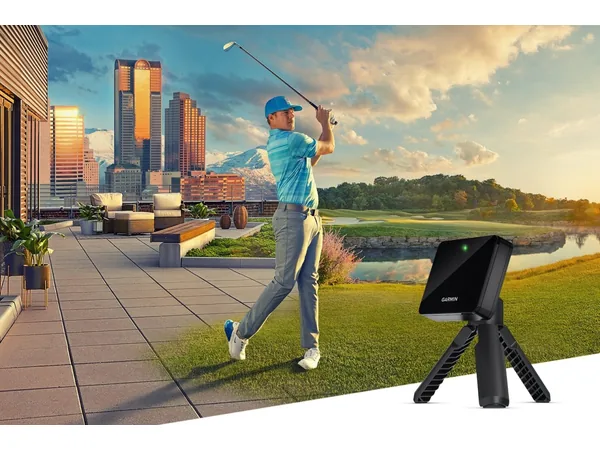
Product reference
Garmin Approach R10 portable golf launch monitor
Best for: Golfers who want shot metrics, session review, and optional simulation through a compatible phone
Trade-off: Needs an aligned radar setup and a compatible phone; some simulation features require membership
How this guide was researched
We compare documented product features against the job each buyer needs done. We have not physically tested these products. Check current specifications and availability with the manufacturer or merchant.
Affiliate disclosure: If you buy through a qualifying link, we may earn a commission at no extra cost to you.