
Practice feedback • buying guide
Garmin R10 vs. SC200 Plus: Which Launch Monitor Fits Your Practice?
Choose the Garmin Approach R10 for richer app analysis and simulation, or the SC200 Plus for simple range feedback without a phone.
Choose the Garmin Approach R10 if you want dispersion charts, club and ball metrics, automatic swing video, saved sessions, and an optional simulator. Choose the Voice Caddie SC200 Plus if you want carry, ball speed, swing speed, and smash factor on a dedicated screen without pairing a phone.
The R10 is the more capable system. The SC200 Plus is the simpler practice tool. Paying for the longer Garmin metric list makes sense only if you will use the app, align the radar carefully, and provide enough space behind the ball. Focused Gadgets has not tested either unit against a reference launch monitor.
Quick comparison
| Buying question | Garmin Approach R10 | Voice Caddie SC200 Plus |
|---|---|---|
| Best for | Shot analysis, session review, and simulation | Fast range feedback and club gapping |
| Results appear on | Compatible phone in Garmin Golf app | Built-in screen with voice readout |
| Core feedback | Club and ball metrics, launch, direction, spin estimates, distance, dispersion | Carry/total distance, ball speed, swing speed, smash factor |
| No-ball speed practice | Garmin lists speed training with a compatible third-party device | Built-in Practice Swing Mode |
| Simulation | Home Tee Hero with membership; compatible third-party options | None |
| Setup behind ball | 6–8ft | 5ft |
| Power | Rechargeable; up to 10 hours claimed | Four AAA batteries; up to 20 hours claimed |
| Main compromise | Phone/app dependence, alignment, space, and paid simulator features | Limited metrics, no app history, no simulation |
Best for richer practice: Garmin Approach R10
The R10 is a compact radar that sends results to the Garmin Golf app. Garmin lists clubhead speed, ball speed, launch angle, launch direction, club path, face angle, angle of attack, spin, apex, smash factor, carry, and total distance among its outputs. Training mode adds club statistics and shot dispersion, while a compatible phone can record swing video with metrics overlaid.
Not every displayed number is measured directly. Garmin’s support documentation identifies clubhead speed, ball speed, launch angle, and launch direction as radar measurements. It describes club-face angle, apex height, and carry distance as calculated by its algorithm, and explains that spin treatment differs indoors and outdoors. That distinction does not make calculated values useless; it means the screen should not be read as twelve independent laboratory measurements.
Garmin publishes accuracy claims of ±3mph for clubhead speed, ±1mph for ball speed, and ±1 degree for launch angle and direction under appropriate setup. It claims ±2 degrees for calculated face angle, ±5ft for apex height, and ±5yd for carry. These are manufacturer specifications, not results verified by Focused Gadgets.
R10 hardware and setup
| Specification | Garmin Approach R10 |
|---|---|
| Dimensions | 3.5 × 2.8 × 1in without tripod |
| Weight | 148g without tripod; about 221g with tripod |
| Battery | Internal rechargeable lithium-ion |
| Claimed runtime | Up to 10 hours |
| Connection | Bluetooth to a compatible smartphone |
| Indoor radar-to-ball distance | 6–8ft |
| Minimum ball flight to net indoors | 8ft |
The indoor footprint is the hidden purchase requirement. Garmin instructs users to place the R10 6–8ft behind the tee and the ball at least 8ft from the net. Before adding swing clearance and safety space behind the impact screen, that is already 14–16ft from radar to net.
Correct alignment matters outdoors too. The red alignment line should point through the ball toward the target, and the radar needs a clear view. If a mat raises the hitting surface, Garmin says the bottom of the unit should sit above the mat. A crooked or partially blocked setup can undermine the usefulness of every metric.
Best for simple range sessions: Voice Caddie SC200 Plus
The SC200 Plus is the more focused device. Place it about 5ft behind the ball on the same level, select the club with the remote, and read or hear the result. It reports carry or total distance, ball speed, swing speed, and smash factor. Voice Caddie’s comparison chart does not list launch angle, direction, or spin for this model.
That smaller set can be an advantage at the range. Carry helps build a club-distance chart, while ball speed and smash factor add context to swing speed. The screen and voice output keep the phone in your bag, and the remote lets you change club settings without walking back to the unit.
Practice Swing Mode reads swing speed without a ball. Target Mode asks you to hit a selected distance, Approach Mode supplies random targets, and Practice Mode records averages for each club during the session. There is no companion app, cloud history, or simulator path.
SC200 Plus hardware and setup
| Specification | Voice Caddie SC200 Plus |
|---|---|
| Dimensions | 3 × 5.9 × 0.98in |
| Weight | 206g |
| Radar | 24GHz K-band Doppler |
| Battery | Four AAA cells |
| Claimed runtime | Up to 20 hours depending on conditions |
| Placement | 5ft behind the ball, level with it |
| Stated distance range | 30–320yd |
| Included | Monitor, remote, and manual |
Replaceable AAA power is convenient on a range trip: spare batteries solve the problem immediately. The trade-off is ongoing battery management rather than USB charging.
Which is better for club gapping?
The SC200 Plus is the cleaner tool when your goal is a practical carry chart and you do not want to manage an app. Hit a reasonable sample with each club, reject obvious mishits rather than cherry-picking only the longest shot, and compare the session averages. Range balls, weather, elevation, and strike quality will keep those numbers from matching every on-course shot.
The R10 offers more context. Dispersion and launch information can show why two clubs with similar average carry behave differently. Session history is also useful when you want to compare changes over time rather than write numbers down manually.
Do not treat either estimated carry value as a permanent truth. A monitor can make practice more consistent, but the ball and conditions still matter.
Which works better into a net?
The R10 is the relevant choice when indoor simulation or visual ball flight matters, provided the room meets Garmin’s clearance requirements. Home Tee Hero requires an active Garmin Golf membership, and compatible third-party simulator software can have separate device and subscription requirements.
The SC200 Plus can provide its four practice metrics into a suitable net and needs less space behind the ball. It does not create a simulated course or shot shape. For a garage or room where the Garmin footprint does not fit, that simplicity can be decisive.
In either case, build the enclosure for safety first. Garmin’s manual calls for adequate ceiling height, a net or screen with free space behind it, coverage for high-lofted and errant shots, and padding on exposed frame sections. A launch monitor does not make an undersized net safe.
What does the Garmin membership add?
The R10’s normal practice metrics and Garmin Golf connection are not the same thing as its paid simulation features. Garmin currently places Home Tee Hero, weekly tournaments, cloud video storage, and other premium golf-app functions under its membership.
Terms and supported third-party software can change. Confirm the current phone compatibility, app region, membership, course access, and external simulator cost before buying hardware specifically for one platform. The SC200 Plus has no comparable subscription because it has no app or simulation service.
Our recommendation
Buy the Garmin Approach R10 if you will study dispersion and launch data, review sessions in an app, or build a simulator with enough physical space. Its richer workflow justifies the extra setup for golfers who actually want analysis.
Buy the Voice Caddie SC200 Plus if you want a fast answer after each range shot, a straightforward club-gapping session, or no-ball speed practice without a phone. Its limited data set is honest and useful rather than incomplete for that job.
If clubhead speed is the only metric you need, both may be more than necessary. Our guide to the Sports Sensors Swing Speed Radar explains when that dedicated speed tool is the more economical choice.
Models discussed
Use these as starting points for checking fit. We do not publish a price or claim hands-on testing.
| Model | Format | Best fit | Trade-off |
|---|---|---|---|
| Garmin Approach R10 portable golf launch monitor | Phone-connected launch monitor | Golfers who want shot metrics, session review, and optional simulation through a compatible phone | Needs an aligned radar setup and a compatible phone; some simulation features require membership |
| Voice Caddie Swing Caddie SC200 Plus | Screen-based launch monitor | Range practice with on-device carry, ball speed, club speed, and smash-factor feedback | No app or simulation; it does not report launch direction, launch angle, or spin |
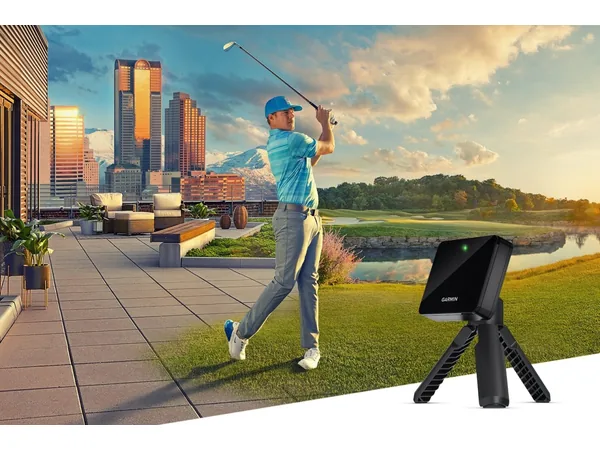
Product reference
Garmin Approach R10 portable golf launch monitor
Best for: Golfers who want shot metrics, session review, and optional simulation through a compatible phone
Trade-off: Needs an aligned radar setup and a compatible phone; some simulation features require membership
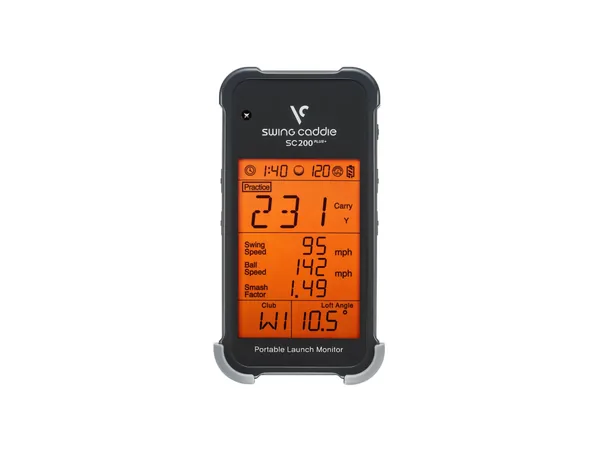
Product reference
Voice Caddie Swing Caddie SC200 Plus
Best for: Range practice with on-device carry, ball speed, club speed, and smash-factor feedback
Trade-off: No app or simulation; it does not report launch direction, launch angle, or spin
How this guide was researched
We compare documented product features against the job each buyer needs done. We have not physically tested these products. Check current specifications and availability with the manufacturer or merchant.
Affiliate disclosure: If you buy through a qualifying link, we may earn a commission at no extra cost to you.