
Backyard discovery • buying guide
Best Bird-Feeder Camera Without a Subscription: What Stays Free?
Compare Humbirdy and Birdbuddy by free AI, local or cloud storage, live viewing, sharing, and the features that may still require a paid plan.
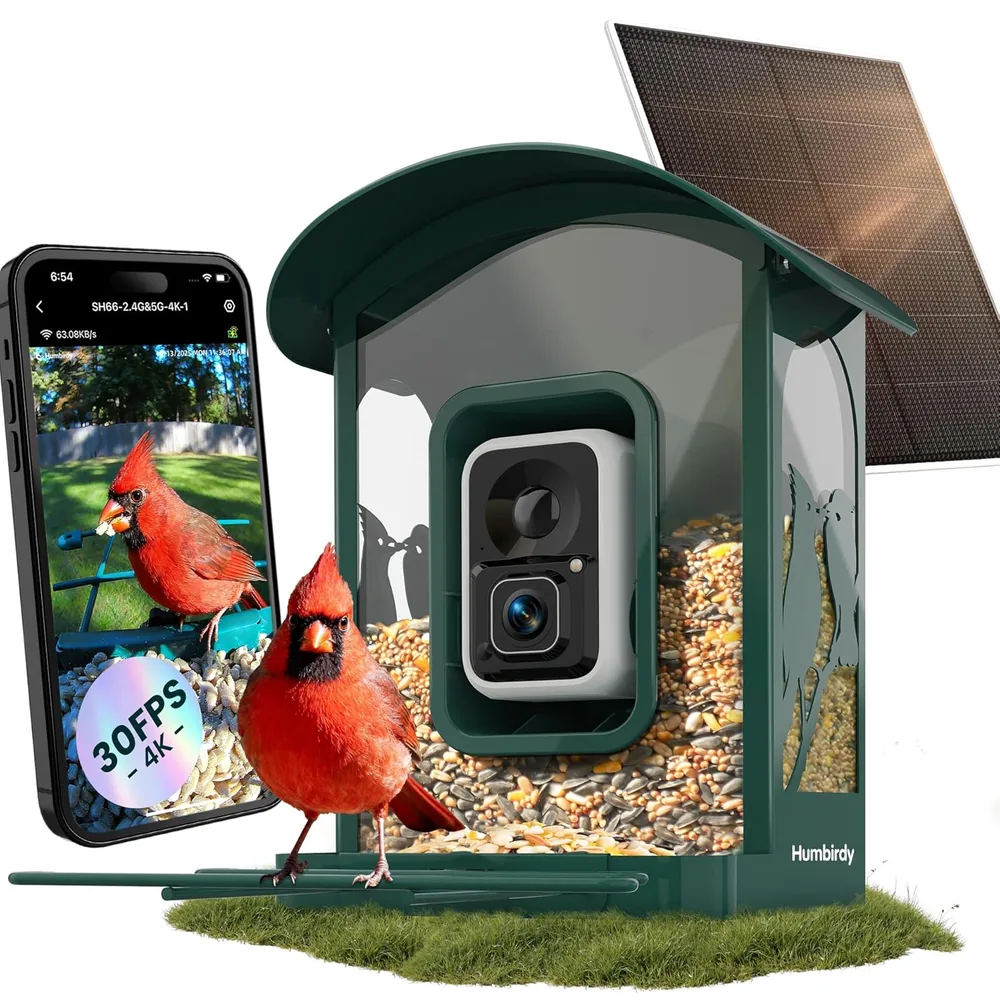
The Humbirdy SH66 is our best verified option when “no subscription” specifically means free AI identification plus local clip storage. Humbirdy documents an exact model, built-in recording, dual-band Wi-Fi, an active companion app, and no recurring charge for its recognition feature.
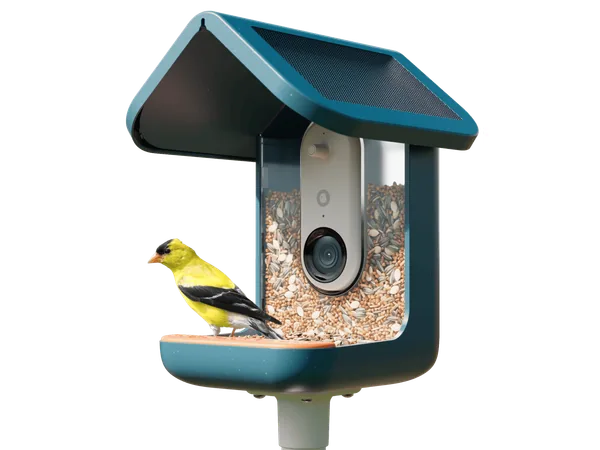
The Birdbuddy PRO Solar remains the best-documented cloud-first alternative. Birdbuddy says its free account includes automatic visit photos and videos, personal live view, downloads, sharing, HD and 2K clips, and manual AI+ identification. A paid membership adds convenience and recognition features rather than making the feeder start working.
There is an important catch: “no subscription” does not mean “works offline.” Humbirdy records locally, but its app and service are still part of pairing, notifications, identification, playback, and sharing. Birdbuddy has no local storage and needs internet access to deliver media through its app. Neither should be treated as a vendor-independent trail camera.
This is a source-based assessment. Focused Gadgets has not physically tested the feeders or compared their recognition accuracy.
Best for local storage and free AI: Humbirdy SH66
Humbirdy’s current SH66 documentation says AI recognition is included at no extra cost. The exact retail listing specifies built-in 32GB storage and says clips can be saved, downloaded, and shared without a cloud plan. Its other manufacturer claims include dual-band Wi-Fi, solar charging, 4K/8MP imaging, and an outdoor-rated metal enclosure.
The ownership model is the reason to consider it—not the resolution label. A local archive avoids a paid cloud-retention plan, and dual-band networking gives the owner more setup options than a 2.4GHz-only camera. The trade-off is a comparatively young app ecosystem whose identification corrections, event frequency, exports, and storage management should be tested before the return period ends.
Local recording also requires careful wording. The camera is not documented as a completely offline device. Buyers who need direct access to files without an account, app, or vendor service should ask Humbirdy to confirm that exact workflow in writing. Our Humbirdy SH66 review has the complete setup and verification checklist.
What you get free with Birdbuddy
Birdbuddy’s current membership matrix is more useful than a vague “subscription optional” label. Its free account includes:
- automatic photos and videos sent as postcards
- personal livestream access, with an eligibility note tied to when some accounts began using the app
- HD and 2K video
- manual AI+ analysis of selected postcards
- downloads and external sharing
- postcards for up to ten guests
- pet alerts, frenzy sensitivity, and Birdbuddy TV
The free tier is enough for the basic promise: see visiting birds, receive clips, save favorites, and request identification when wanted. Individual Premium makes AI+ analysis automatic and adds features such as recurring-bird naming, unlimited Nature Chat, an ignored-species list, and other enhancements. Family Premium extends premium access and livestreaming to guests.
That guest distinction is easy to miss. Free guests can receive postcards, but Birdbuddy lists guest livestream access under Family Premium. If the feeder is a gift for a household, decide whether sharing captured visits is sufficient or whether several people expect their own live feed.
Birdbuddy versus Birdfy without a recurring plan
Birdfy Feeder 2 Pro is the most relevant non-catalog alternative to compare. Its official page says the free app provides live view, alerts, recorded clips, and monthly recaps. It also advertises unlimited cloud storage with 30-day retention. The Feeder 2 series does not support microSD playback, so it is cloud-dependent too.
| Ownership question | Birdbuddy PRO Solar | Birdfy Feeder 2 Pro |
|---|---|---|
| Live view without a paid plan | Personal livestream documented, with an account-eligibility footnote | Free app advertises live view |
| Automatic clips | Included | Included |
| Free identification | Manual AI+ analysis | Depends on the AI bundle purchased |
| Guest access | Up to 10 guests receive postcards; guest livestream is a Family feature | Manufacturer says unlimited shared accounts can view live and recorded clips |
| Storage | Cloud/app workflow; no local storage | Cloud only; 30-day retention stated |
| Solar hardware | Detachable solar roof in the PRO Solar bundle | Solar panel included with the Pro model |
| Product status here | Verified catalog recommendation | Research alternative, not an affiliate product card |
Birdfy sells materially different AI packages. The “AI by Subscription” version includes a trial and then offers monthly, annual, or one-time payment choices, while an “AI Lifetime Free” bundle includes recognition in the purchase. Compare the exact regional product option, not just the feeder name. A cheaper subscription-version listing is not equivalent to the lifetime-AI bundle.
“No subscription” has three different meanings
No payment required to operate
The camera connects, sends notifications, and provides some form of viewing without a paid plan. Both Birdbuddy and Birdfy make that claim for the current products discussed here.
No payment required for the feature you want
This is narrower. Automatic species identification, longer history, multiple live viewers, summaries, or advanced clip quality may sit behind a plan or a more expensive bundle. Write down the one or two functions that prompted the purchase and check those rows in the current plan table.
No dependence on the vendor’s cloud
Neither of these feeders meets that standard. Birdbuddy says its Nature Cam generation has no local storage, and Birdfy says Feeder 2 uses cloud storage rather than microSD. If the provider changes its service or stops supporting the product, the camera’s usefulness could change even if you never paid a subscription.
Storage matters more than the word “free”
A free 30-day cloud window can be generous for casual birdwatching, but it is still a deletion schedule. Download clips you care about instead of treating the app as a permanent archive. Check whether downloads preserve the resolution and metadata you expect.
Local microSD storage avoids a recurring cloud fee and can keep recording under some internet failures, but it creates its own inconvenience: retrieving a card from an outdoor feeder, managing capacity, and securing physical footage. Some cameras also require the app or internet even when a card is installed. “Supports microSD” is not proof of fully offline operation.
Check the garden before choosing the plan
Birdbuddy PRO Solar uses 2.4GHz Wi-Fi and must reach the internet. Test the intended location before installing a pole or drilling into a fence. A phone showing one bar in the garden is a warning, not a guarantee that the feeder’s smaller antenna will hold a stable link.
Solar charging reduces how often you bring the camera indoors; it does not make the system maintenance-free. Shade, short winter days, cold weather, dirty panels, frequent visits, and livestream use all affect the power balance. You must still refill and clean the feeder, download valued clips, and occasionally troubleshoot the connection.
Our recommendation
Choose Humbirdy SH66 if “without a subscription” means you want free AI identification and local clip storage, and you are willing to evaluate a newer app carefully. It is the clearest verified catalog fit for avoiding both a recurring recognition fee and cloud-only retention.
Choose Birdbuddy PRO Solar if “without a subscription” means you want useful automatic clips, personal live view, manual identification, and downloads without another monthly bill. Its published free-tier documentation is unusually clear, and the premium plan is optional for the core experience.
Compare Birdfy Feeder 2 Pro if shared live access or its dual-camera framing interests you. Verify whether the exact package includes lifetime AI or merely a subscription trial, and accept that its footage is cloud-only.
Choose neither if you require fully offline access or a system that remains independent of the manufacturer’s service. Humbirdy offers local recording but still uses an app-led workflow; Birdbuddy and Birdfy are cloud-first. The linked smart-feeder guide covers the broader hardware decision, while Birdbuddy versus HARYMOR explains why exact model documentation matters before trusting a marketplace claim.
Models discussed
Use these as starting points for checking fit. We do not publish a price or claim hands-on testing.
| Model | Format | Best fit | Trade-off |
|---|---|---|---|
| Humbirdy SH66 4K Ultra AI Bird Feeder | 4K smart bird feeder with local storage and solar charging | Buyers who prioritize local storage and no recurring AI fee | The experience still depends on a comparatively young app ecosystem |
| Birdbuddy PRO Solar Smart Bird Feeder | Integrated camera feeder with solar roof | Documented free core features | Live-view eligibility, Wi-Fi reach, and optional paid features |
Product reference
Humbirdy SH66 4K Ultra AI Bird Feeder
Best for: Buyers who prioritize local storage and no recurring AI fee
Trade-off: The experience still depends on a comparatively young app ecosystem
Product reference
Birdbuddy PRO Solar Smart Bird Feeder
Best for: Documented free core features
Trade-off: Live-view eligibility, Wi-Fi reach, and optional paid features
How this guide was researched
We compare documented product features against the job each buyer needs done. We have not physically tested these products. Check current specifications and availability with the manufacturer or merchant.
Affiliate disclosure: If you buy through a qualifying link, we may earn a commission at no extra cost to you.